The best way to organize firearms, ammo, and optics is to keep them connected instead of tracking each one separately.
A firearm record by itself is useful. An ammo inventory by itself is useful. An optics list by itself is useful. But when those records are separated across notebooks, spreadsheets, phone photos, receipts, and memory, the system starts falling apart.
The real value comes from knowing how everything works together.
Which ammo performs best in which firearm? Which optic is mounted on which rifle? How many rounds have gone through each firearm? When was it last cleaned? What setup did you use during your last range session? Which target photos belong to which firearm and ammo combination?
If you cannot answer those questions quickly, your records are not organized. They are scattered.
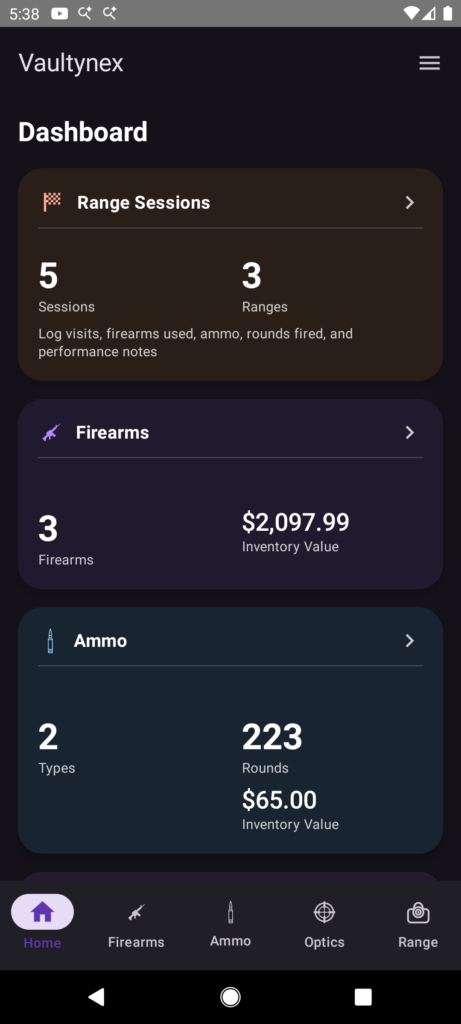
Vaultynex helps shooters organize firearms, ammo, optics, range sessions, round counts, maintenance notes, target photos, and shooting progress in one place so the information actually stays useful.
Why Firearm Organization Matters
Firearm organization is not just about having a clean list of what you own.
A useful firearm record should help you understand each firearm’s history, usage, setup, and condition. That matters whether you are a casual range shooter, hunter, collector, or someone who trains regularly.
A proper firearm record can include details like:
- Make and model
- Caliber
- Serial number
- Purchase date
- Purchase price
- Total rounds fired
- Last cleaned date
- Maintenance notes
- Range session history
- Attached optic or accessories
The problem with basic notes is that they usually stop at ownership details. That is not enough.
If you want your records to be useful, your firearm inventory should connect to your ammo, optics, range sessions, maintenance history, and performance notes.
You can learn more about this on the firearm inventory app page.
Why Ammo Should Not Be Tracked Separately
Ammo tracking gets messy fast when it is handled separately from the rest of your shooting records.
A spreadsheet might tell you that you have 500 rounds of a certain caliber, but that does not tell the full story. It may not show which firearm used that ammo, how it performed, what group sizes you got, whether there were malfunctions, or how much ammo was used during each range session.
That is the weakness of disconnected ammo tracking.
A better ammo record should include:
- Caliber
- Brand
- Ammo type
- Bullet weight
- Quantity on hand
- Low-stock level
- Purchase price
- Cost per round
- Range session usage
- Performance notes
When ammo records are connected to your range sessions, you can see what you actually used and how it performed. That makes your inventory more useful than a simple count.
Vaultynex includes ammo tracking so shooters can manage quantities, usage, cost, and range session history without fighting with spreadsheets.
You can also read more about how to track ammo inventory without a spreadsheet and how to calculate ammo cost per round.
Why Optics Need Their Own Records
Optics are easy to overlook until your setup starts changing.
If you only own one firearm and one optic, tracking may feel simple. But once you have multiple rifles, scopes, red dots, mounts, or backup optics, things get more complicated.
You may want to know:
- Which optic is mounted on which firearm
- When the optic was purchased
- What magnification or reticle it has
- What it cost
- Whether it held zero
- What range sessions it was used in
- Which firearm and ammo setup performed best with it
This is where a basic spreadsheet starts to feel weak.
An optic is not just an item in a list. It is part of a shooting setup. If you want useful records, your optics need to connect to firearms and range sessions.
Vaultynex helps with optics tracking so shooters can keep optic details, firearm pairings, and setup notes organized.
The Problem With Spreadsheets and Paper Notes
Spreadsheets and paper notes can work at the beginning, but they usually become a mess.
The issue is not that spreadsheets are useless. The issue is that they are not built around how shooters actually use their gear.
Firearm records, ammo inventory, optics, range sessions, target photos, round counts, and maintenance notes all affect each other. When those records live in separate places, you lose context.
Common problems include:
- Forgetting to update ammo after a range trip
- Losing track of round counts
- Not knowing which optic was used
- Target photos buried in your phone gallery
- No clear cleaning or maintenance history
- No easy way to compare firearm and ammo performance
- No useful history of range sessions over time
That is not organization. That is a pile of disconnected information.
If you shoot regularly, your system needs to be quick, connected, and easy to update.
Connect Firearms, Ammo, Optics, and Range Sessions
The strongest way to organize firearms, ammo, and optics is to connect them through your range sessions.
A range session is where the information comes together.
During a range trip, you use a firearm, fire specific ammo, possibly use an optic, record a distance, shoot a group, take target photos, and add notes about how everything performed.
That session creates context.
Instead of only knowing that you own a rifle, you can see how that rifle performed with a specific ammo brand and optic at a specific distance. Instead of only knowing that you own a scope, you can see which firearm it was used on and whether the setup worked well. Instead of only knowing how much ammo you have, you can see how much you used and what results it produced.
This is why range session tracking is one of the most important parts of a good firearm organization system.
You can also read more about why you should keep a range session log.
Use Round Counts to Track Firearm Usage
Round count tracking is one of the most useful parts of firearm organization.
Knowing how many rounds have gone through each firearm helps you understand usage, maintenance needs, cleaning history, and long-term wear.
Round counts can help you track:
- Total rounds fired by firearm
- Rounds fired during each range session
- Ammo usage over time
- Training volume
- Cleaning and maintenance needs
- Reliability patterns
This becomes even more useful when connected to maintenance records.
If a firearm starts having issues after a certain number of rounds, that is worth knowing. If accuracy changes after several sessions, your round count and cleaning history may help explain why.
Vaultynex helps shooters connect firearm records with range sessions, round counts, and maintenance tracking. You can learn more on the firearm maintenance tracker page.
Keep Target Photos With the Right Records
Target photos are useful, but only if they have context.
A target photo sitting in your phone gallery does not tell you much if you forget which firearm, ammo, optic, distance, and date it belongs to.
A useful target photo should be attached to the range session where it was taken.
That way, you can review:
- Group size
- Shot placement
- Point of impact
- Firearm used
- Ammo used
- Optic used
- Shooting distance
- Session notes
This turns a basic photo into a useful performance record.
Vaultynex helps with target photo tracking and group size tracking so your shooting history is easier to review later.
You can also read why target photos are useful in a shooting log and how to track group size and shooting accuracy over time.
Organizing Firearms, Ammo, and Optics in Vaultynex
Vaultynex is built to help shooters keep their firearm records connected instead of scattered.
With Vaultynex, you can organize:
- Firearm inventory
- Ammo inventory
- Optics
- Range sessions
- Round counts
- Group sizes
- Target photos
- Cleaning dates
- Maintenance notes
- Ammo usage
- Cost per round
- Performance history
- Backup and restore
The point is not to collect data for no reason. The point is to make your records useful when you actually need them.
Before a range trip, you can check what ammo you have. After a range trip, you can log what you fired. When reviewing performance, you can compare firearm, ammo, optic, distance, group size, and target photos together.
That is much stronger than a spreadsheet or a folder full of random notes.
Suggested Vaultynex Screenshots
Add screenshots in these places:
- After the opening section: Vaultynex dashboard showing firearms, ammo, optics, and range sessions.
- After the ammo section: Ammo inventory screen showing caliber, quantity, and cost details.
- After the optics section: Optics tracking screen showing optic details and firearm pairing.
- After the range session section: Range session detail screen showing firearm, ammo, optic, distance, and notes.
- Near the bottom: Smart Insights or printable report screen showing connected shooting history.
Suggested image alt text:
- Vaultynex dashboard showing firearms ammo optics and range sessions
- Vaultynex ammo inventory screen for organizing ammunition
- Vaultynex optics tracking screen connected to firearm records
- Vaultynex range session screen with firearm ammo and optic details
Download Vaultynex
Start using Vaultynex to organize firearms, ammo, optics, range sessions, round counts, maintenance notes, target photos, and shooting progress in one app.
Download Vaultynex on Google Play
Stop scattering your shooting records across spreadsheets, photos, and memory. Organize your firearms, ammo, optics, and range sessions with Vaultynex so your records stay useful every time you head to the range.